
Booking.com Approved Email Senders & Links
Booking.com are adding additional security to systems

Admin 1
Last Update 3 months ago
booking.com is now strictly enforcing the additional requirement for hosts to approve email senders addresses and domains that send links to guests in their accounts.
This is to ensure that emails sent by GuestAdmin can be delivered to the booking.com generated email addresses that are used to mask guests’ real email addresses. And any links in them such as the online guest registration URLs such as https://guest.guestadmin.io/uniquelink are NOT automatically removed by booking.com system.
As a result, the email addresses [email protected] and [email protected] (both are required) must now be added to the approved senders list in the host's booking.com extranet account, and the GuestAdmin domain MUST be added to your properties through the booking host portal.
Below are the steps to do this:
How do I approve an email senders address?
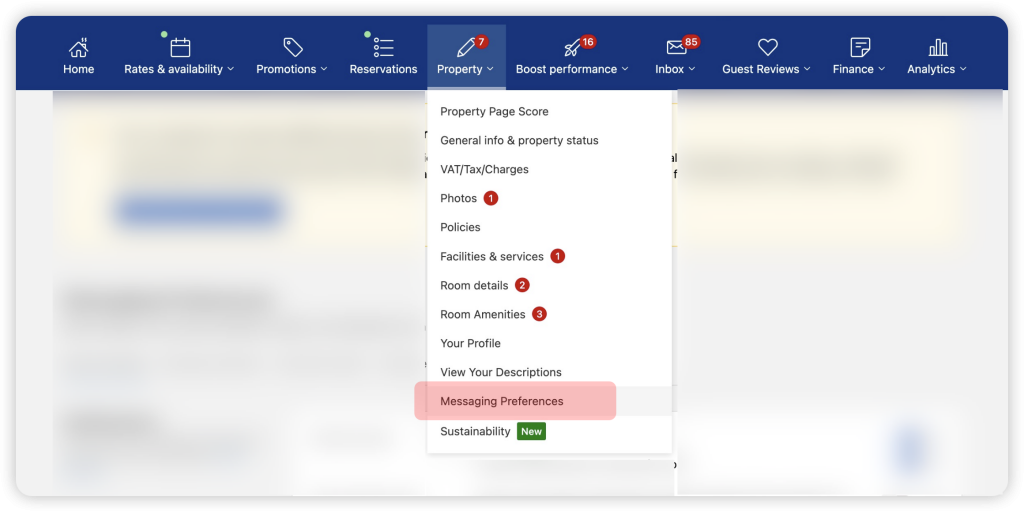
2. From the main menu, go to Property > Messaging preferences > Security settings and authenticate yourself if needed.

3. On the security settings page, go to the section titled "Your email addresses" and click on the button Add email address.

4. Please add [email protected] and [email protected] (both are required) to the booking.com extranet system as shown below

The new email sender approval has been successfully set up, and your guests will receive our email communications from now on.
Now Add Your Approved Links
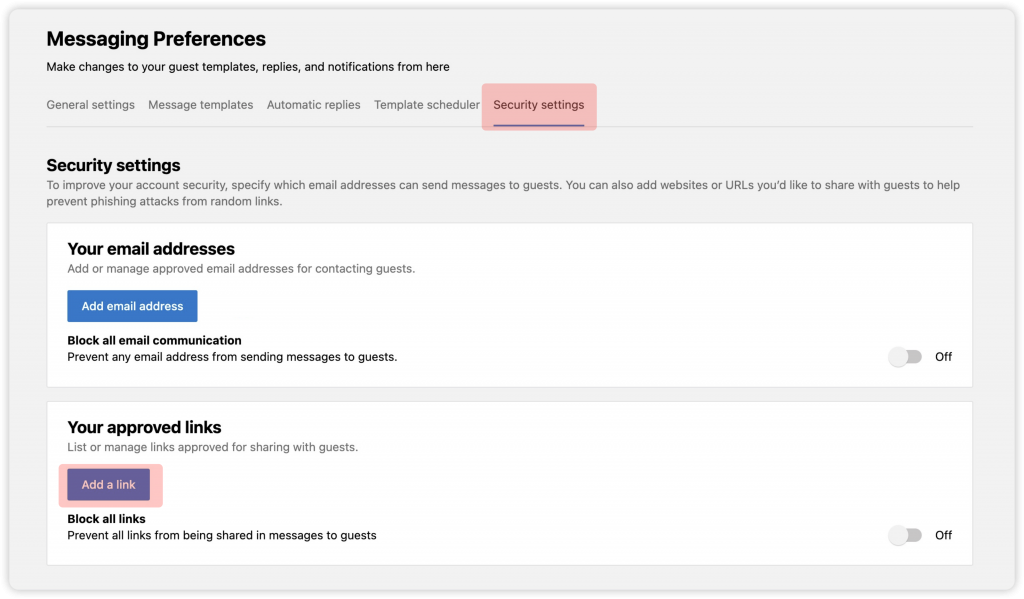
6. Enter these 2 domain links:
GUESTADMIN TEAM